
Archives

Avoid Hiring Agencies That String You Along with Test Tasks

The job search process can be stressful, especially when dealing with hiring agencies. While some agencies genuinely aim to help candidates secure jobs, others might take advantage of job seekers by assigning numerous tasks, only to ghost them or leave them hanging with no feedback. These agencies can waste your […]

The job search process can be stressful, especially when dealing with hiring agencies. While some agencies genuinely aim to help candidates secure jobs, others might take advantage of job seekers by assigning numerous tasks, only to ghost them or leave them hanging with no feedback. These agencies can waste your time, energy, and sometimes even your skills. To help you avoid being strung along, here are a few warning signs and tips on how to protect yourself.

1. Too Many Unpaid Test Tasks

One of the most common ways an agency might string you along is by assigning multiple test tasks. These tasks are often time-consuming and unpaid. In some cases, companies may use these tasks as free labor, benefiting from your hard work without any intention of hiring you. If you find yourself repeatedly completing tasks with little to no feedback or outcome, it’s time to reconsider your relationship with that agency.

What to watch out for:

  • Multiple tasks: Completing a small assignment to showcase your skills is normal, but if you’re being asked to complete several tasks for free, you may be wasting your time.
  • No clear end: If the agency can’t give you a solid timeline or explain how many steps are in the process, that’s a red flag.

What to do:

  • After completing one or two tasks, politely ask when you can expect a decision or next steps. If they’re evasive, consider cutting ties.
  • If the tasks seem overly complex or unrelated to the role, question whether they’re using your skills for free labor.

2. Vague Communication or Constant Delays

Agencies stringing candidates along often engage in vague communication, leaving you in the dark about your status. They may promise to “get back to you soon” or say they’re “waiting to hear from the client” but fail to give you concrete timelines. This can lead to endless waiting without clarity.

What to watch out for:

  • Lack of specific timelines: They tell you decisions will be made “soon” but never define what “soon” means.
  • Delayed feedback: If you finish tasks but get minimal or no feedback over long periods, the agency might not be prioritizing you.

What to do:

  • Set boundaries on your availability. After the first few delays, give a clear timeline for when you expect a response. If they don’t meet it, move on.
  • Ask for regular updates or clarity on the hiring timeline. Agencies that respect your time will provide these.

3. Unclear Hiring Process

If the hiring process seems unnecessarily long, confusing, or undefined, the agency might be stringing you along. A well-run hiring process will have clear steps, such as interviews, test tasks, and final decisions. If the agency can’t explain these steps, it’s likely they’re disorganized—or worse, they might not have real opportunities lined up for you.

What to watch out for:

  • No clear hiring process: If they can’t outline the stages of the interview process, they may not have a plan.
  • Shifting requirements: If they keep changing the role description, qualifications, or required tasks, they could be trying to squeeze free work out of you.

What to do:

  • Before committing to multiple tasks, ask for a detailed explanation of the entire process.
  • If they’re reluctant or vague in their answers, consider looking elsewhere. Transparency is a sign of professionalism.

4. The Job Doesn’t Seem Real

Some hiring agencies will string along candidates for jobs that don’t even exist. In these cases, they’re collecting your personal data, portfolio, and perhaps even free labor to pad their client roster or look good on paper. If the job listing or agency seems fishy, you should proceed with caution.

What to watch out for:

  • No clear job listing: If they can’t point you to a specific job listing or share job details, the position may not exist.
  • Too many “interested parties”: If they constantly tell you other candidates are being considered but never progress with your application, it could be a tactic to keep you on the hook.

What to do:

  • Research the agency’s reputation. Look for online reviews, ask about them on forums, and check LinkedIn for employees or former clients.
  • Ask for direct contact with the hiring company. A legitimate job will often allow you to eventually connect with someone from the business itself.

5. No Contract or Agreement for Long-Term Assignments

When a hiring agency asks you to commit significant time to a task or project without offering any form of contract, it’s a major red flag. Agencies that respect their candidates will provide clear agreements outlining expectations, timelines, and compensation when applicable.

What to watch out for:

  • No written agreement: If the task involves more than a couple of hours, there should be a contract in place.
  • Vague project requirements: If the project brief is unclear and you’re unsure of what’s expected of you, it might be an indication that they don’t value your time.

What to do:

  • Ask for a contract or freelance agreement if the task requires considerable time or effort. If they refuse, it’s time to move on.
  • Clarify upfront if the task is paid or unpaid, and be cautious of agencies that ask for too much free work.

How to Protect Yourself

Now that you know the warning signs, here are a few tips on how to safeguard your time and energy:

  1. Do your research: Before working with any agency, look them up online. See if they have positive reviews and testimonials from other job seekers. Check sites like Glassdoor or LinkedIn for insights.
  2. Set boundaries: You have every right to protect your time. Make sure you have clear expectations from the agency regarding timelines, tasks, and hiring steps.
  3. Track your work: If you’re doing test tasks, keep a record of what you’ve completed, including dates and details. This can help you identify patterns and avoid situations where your work isn’t valued.
  4. Don’t be afraid to walk away: If something feels off or the process is dragging on too long, trust your instincts. There are plenty of agencies and companies out there that will treat you with respect.

In conclusion, while hiring agencies can be helpful, it’s important to be cautious of those that string candidates along. Avoid Hiring Agencies That String You Along with Test Tasks. By paying attention to red flags, setting clear expectations, and protecting your time, you can avoid getting caught up in endless test tasks that go nowhere. Stay vigilant, and don’t let anyone take advantage of your talents for free!
Posted in General, General Tech InformationTagged , Leave a Comment on Avoid Hiring Agencies That String You Along with Test Tasks

The Importance of Core Web Vitals and Their Impact on Google Search Algorithms

In the fast-paced digital age, website performance is crucial for delivering a great user experience. Whether you run an e-commerce platform, a blog, or a corporate website, ensuring that your site is fast, responsive, and user-friendly is key to attracting and retaining visitors. One of the most critical aspects of […]

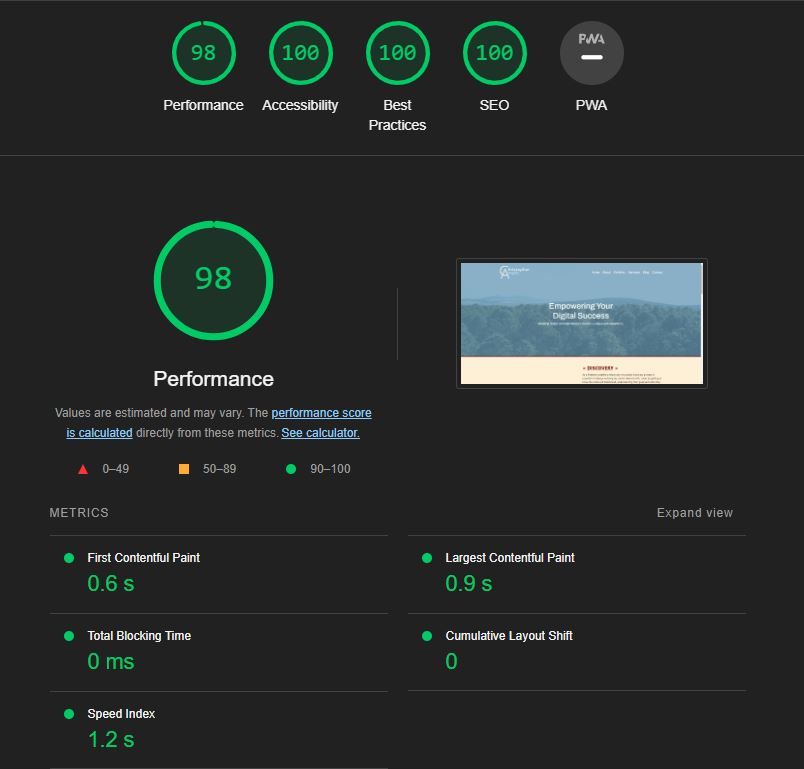
In the fast-paced digital age, website performance is crucial for delivering a great user experience. Whether you run an e-commerce platform, a blog, or a corporate website, ensuring that your site is fast, responsive, and user-friendly is key to attracting and retaining visitors. One of the most critical aspects of website performance is Core Web Vitals, a set of specific factors that Google considers important for the overall user experience. These vitals have become an essential part of Google’s ranking algorithms, directly influencing your site’s visibility in search results. Let’s explore why Core Web Vitals are so important and how they impact your website’s performance in Google search. Core Web Vitals and Impact on Google Search Algorithms.

What Are Core Web Vitals?

Core Web Vitals are a set of metrics introduced by Google to measure key aspects of user experience on a website. They focus on three primary elements:

  1. Largest Contentful Paint (LCP): This measures the loading performance of your site. Specifically, it tracks the time it takes for the largest piece of content (such as an image or text block) to load and become visible to users. An ideal LCP is 2.5 seconds or faster.
  2. First Input Delay (FID): FID measures interactivity, tracking the time it takes for your site to respond to the first interaction from a user, like clicking a link or tapping a button. A good FID is less than 100 milliseconds.
  3. Cumulative Layout Shift (CLS): CLS measures visual stability, ensuring that the layout of your page doesn’t shift unexpectedly as elements load. A low CLS score (less than 0.1) is ideal to prevent content from moving around unexpectedly, which can frustrate users.

Why Core Web Vitals Matter

  1. User Experience: Core Web Vitals directly impact the user experience. A website that loads quickly, responds promptly, and remains visually stable keeps users engaged and reduces bounce rates. Poor performance in these areas can lead to a frustrating experience, causing visitors to abandon your site and potentially turn to competitors.
  2. SEO and Google Search Rankings: Google has integrated Core Web Vitals into its search algorithms, meaning that these metrics directly affect your site’s ranking in search results. Websites that perform well on Core Web Vitals are more likely to rank higher, which can significantly boost organic traffic. Conversely, poor performance can result in lower rankings, making it harder for potential visitors to find your site.
  3. Mobile-First Indexing: With the rise of mobile browsing, Google has shifted to mobile-first indexing, meaning it primarily uses the mobile version of your site for ranking and indexing. Core Web Vitals play a crucial role in ensuring that your mobile site performs well, providing a seamless experience for users on smartphones and tablets.
  4. Conversion Rates: A well-performing site not only improves user experience but also has a direct impact on conversion rates. Faster load times and responsive interactions can lead to higher conversions, whether it’s completing a purchase, filling out a form, or signing up for a newsletter. Studies have shown that even a one-second delay in page load time can lead to a significant drop in conversions.
  5. Competitive Advantage: In a crowded online marketplace, standing out is essential. By optimizing your Core Web Vitals, you gain a competitive edge over sites that may not prioritize these metrics. This advantage can lead to better rankings, more traffic, and ultimately, more business.

How to Improve Your Core Web Vitals

Improving Core Web Vitals requires a combination of technical optimization and content strategy:

  1. Optimize Images and Media: Ensure that images are properly compressed and use next-gen formats like WebP. Lazy loading can help prioritize content that needs to be displayed first.
  2. Minimize JavaScript: Excessive or poorly optimized JavaScript can delay your site’s interactivity. Minify and defer non-essential scripts to improve FID.
  3. Improve Server Response Times: A slow server can increase your LCP. Consider upgrading your hosting plan, using a Content Delivery Network (CDN), and optimizing your server settings to reduce response times.
  4. Use a Responsive and Stable Layout: Ensure your site’s layout is responsive across devices and screen sizes. Avoid sudden shifts in content by setting explicit size attributes for images and media.
  5. Monitor and Test Regularly: Use tools like Google PageSpeed Insights, Lighthouse, or Search Console to regularly monitor your Core Web Vitals. Continuous testing and optimization are key to maintaining a high-performing site.

Core Web Vitals and Impact on Google Search Algorithms. Core Web Vitals are not just another set of metrics; they are integral to your website’s success in today’s digital landscape. By focusing on these key performance indicators, you not only improve user experience but also enhance your site’s visibility and rankings on Google. In a world where seconds matter, investing in optimizing your Core Web Vitals can lead to better user engagement, higher conversion rates, and a strong competitive edge in search engine results. As Google continues to prioritize user experience, ensuring that your site meets or exceeds these standards is crucial for long-term success.

Posted in General, General Tech InformationTagged , , , , Leave a Comment on The Importance of Core Web Vitals and Their Impact on Google Search Algorithms

AI for Optimal Productivity and Efficiency in You Daily Routine

In the 21st century, technological advancements have revolutionized the way we live, work, and interact. Among these innovations, Artificial Intelligence (AI) stands out as a transformative force, offering unparalleled opportunities to enhance our daily routines and streamline our lives. From personalized assistance to predictive analytics, incorporating AI into your daily […]

In the 21st century, technological advancements have revolutionized the way we live, work, and interact. Among these innovations, Artificial Intelligence (AI) stands out as a transformative force, offering unparalleled opportunities to enhance our daily routines and streamline our lives. From personalized assistance to predictive analytics, incorporating AI into your daily routine can significantly boost productivity, efficiency, and overall well-being. In this blog post, we’ll explore the best ways to leverage AI for optimal productivity and efficiency in You daily routine.

  1. Personalized Assistance:

Imagine having a personal assistant available at your fingertips 24/7, ready to help with tasks, manage your schedule, and provide valuable insights. AI-powered virtual assistants like Siri, Google Assistant, and Alexa have made this a reality. By leveraging natural language processing and machine learning algorithms, these virtual assistants can understand your voice commands, answer questions, set reminders, and even perform tasks like sending emails or ordering groceries online. Integrate these assistants into your daily routine to offload mundane tasks and focus on more meaningful activities.

  1. Time Management and Planning:

AI-driven tools excel at analyzing vast amounts of data and providing actionable insights. Utilize AI-powered scheduling apps like Google Calendar or Microsoft Outlook to optimize your time management. These apps can automatically schedule meetings, prioritize tasks, and suggest time slots based on your availability and preferences. Moreover, AI-driven project management platforms like Trello or Asana can help you organize tasks, assign deadlines, and track progress efficiently. By delegating the burden of scheduling and planning to AI, you can allocate more time to strategic thinking and creative endeavors.

  1. Health and Wellness Monitoring:

Maintaining a healthy lifestyle is crucial for overall well-being, but it can be challenging to track various health metrics consistently. AI-powered wearable devices like smartwatches and fitness trackers offer a convenient solution. These devices use sensors and algorithms to monitor vital signs, track physical activity, and analyze sleep patterns. By syncing with accompanying apps, they provide personalized recommendations for exercise, nutrition, and sleep hygiene. Incorporate these devices into your daily routine to stay motivated, set fitness goals, and track your progress effectively.

  1. Smart Home Automation:

Transform your living space into a smart home with AI-powered automation systems. Smart thermostats like Nest Learning Thermostat can adjust temperature settings based on your preferences and occupancy patterns, optimizing energy usage and reducing utility bills. Smart lighting systems like Philips Hue can create custom lighting schemes to enhance ambiance and productivity throughout the day. Additionally, AI-powered home security cameras and alarm systems offer peace of mind by detecting unusual activities and sending alerts to your smartphone. By automating routine tasks and enhancing comfort and security, smart home technology simplifies daily living.

  1. Learning and Personal Growth:

Continuous learning is essential for personal and professional growth, but finding the time and resources for education can be challenging. AI-driven learning platforms like Coursera, Udemy, and Khan Academy offer a vast array of online courses and tutorials on various subjects, from programming and data science to art and philosophy. These platforms use AI algorithms to recommend courses based on your interests, learning style, and skill level. By dedicating a few minutes each day to online learning, you can acquire new knowledge, develop valuable skills, and stay ahead in a rapidly evolving world.

AI for optimal productivity and efficiency in You daily routine can revolutionize the way you live, work, and thrive. By leveraging AI-powered tools and technologies, you can delegate mundane tasks, optimize time management, monitor health and wellness, automate home environments, and facilitate continuous learning and personal growth. Embrace the power of AI to unlock your full potential and achieve greater productivity, efficiency, and fulfillment in every aspect of your life.

Posted in Artificial Intelligence, General Tech InformationTagged , , , ,

Exploring Free Photoshop Alternatives

In the world of digital design and photo editing, Adobe Photoshop stands as an undisputed giant. Its robust features and versatility have made it an industry standard for professionals and enthusiasts alike. However, Photoshop comes with a hefty price tag, which might not be feasible for everyone, especially beginners or […]

In the world of digital design and photo editing, Adobe Photoshop stands as an undisputed giant. Its robust features and versatility have made it an industry standard for professionals and enthusiasts alike. However, Photoshop comes with a hefty price tag, which might not be feasible for everyone, especially beginners or hobbyists. Thankfully, the digital landscape is brimming with free alternatives that offer impressive capabilities without costing a dime. Let’s explore some of these free Photoshop alternatives that can help you unleash your creativity without breaking the bank. Exploring Free Photoshop Alternatives.

  1. GIMP (GNU Image Manipulation Program): GIMP is perhaps the most well-known and powerful free alternative to Photoshop. It’s an open-source software that offers a wide range of tools for image editing, retouching, and enhancing. From basic tasks like cropping and resizing to advanced features like layers and masks, GIMP has everything you need to bring your creative vision to life. Its customizable interface and extensive community support make it a favorite among users seeking a professional-grade editing experience without spending a penny.
  2. Krita: Originally designed for digital painting, Krita has evolved into a versatile software that caters to various creative needs, including photo editing and manipulation. With a user-friendly interface and a plethora of brushes and effects, Krita empowers artists and designers to explore their imagination freely. Whether you’re a professional illustrator or a hobbyist photographer, Krita offers a seamless editing experience with its intuitive tools and powerful features.
  3. Pixlr: Pixlr is a web-based photo editing tool that combines simplicity with functionality. With its easy-to-use interface and a wide array of editing options, Pixlr is perfect for quick edits and enhancements on the go. Whether you’re editing photos for social media or creating graphics for your blog, Pixlr’s intuitive controls and real-time preview make the process fast and hassle-free. Plus, it offers both web and mobile versions, ensuring that you can edit your photos anytime, anywhere.
  4. Photopea: If you’re looking for a Photoshop alternative that closely mimics its interface and features, Photopea is the perfect choice. This web-based application offers a remarkably similar user experience to Photoshop, allowing users to seamlessly transition between the two platforms. With support for PSD files and a comprehensive set of editing tools, Photopea is ideal for users who are familiar with Photoshop but prefer a free alternative.
  5. Paint.NET: Paint.NET is a lightweight yet powerful image editing software that strikes a perfect balance between simplicity and functionality. With its user-friendly interface and a wide range of tools and effects, Paint.NET is an excellent choice for beginners and casual users. Whether you’re editing photos, creating graphics, or retouching images, Paint.NET offers all the essential features you need to unleash your creativity without any cost.

Exploring Free Photoshop Alternatives – while Adobe Photoshop remains the gold standard in the world of digital design and photo editing, there are plenty of free alternatives available that offer comparable features and functionality. Whether you’re a professional designer, a budding artist, or simply someone who enjoys editing photos as a hobby, these free Photoshop alternatives provide a viable option to explore your creativity without having to invest in expensive software. So why wait? Download one of these free tools today and start unleashing your imagination without breaking the bank!

Posted in Design, General Tech Information, Web Development InformationTagged , , , , Leave a Comment on Exploring Free Photoshop Alternatives

The Top Image Optimization Plugins for WordPress Websites

In the digital realm, where attention spans are short and website loading times are crucial, optimizing images is imperative for maintaining a smooth user experience. Fortunately, WordPress users have access to a plethora of plugins designed to streamline this process. In this blog post, we’ll explore seven top-notch image optimization […]

In the digital realm, where attention spans are short and website loading times are crucial, optimizing images is imperative for maintaining a smooth user experience. Fortunately, WordPress users have access to a plethora of plugins designed to streamline this process. In this blog post, we’ll explore seven top-notch image optimization plugins for WordPress websites, each offering unique features to enhance your site’s performance.

1. Smush: Smush stands tall as one of the most popular image optimization plugins for WordPress. With its automatic compression and bulk optimization capabilities, Smush seamlessly reduces image file sizes without compromising quality. Additionally, it offers image resizing options, ensuring your visuals are optimized for various screen sizes and devices.

2. ShortPixel: ShortPixel is another powerhouse in the realm of image optimization plugins. By compressing images upon upload, ShortPixel helps WordPress users improve website loading times significantly. Moreover, its support for different image formats and customizable compression options allows for fine-tuning according to specific needs.

3. Imagify: Renowned for its user-friendly interface and effective optimization techniques, Imagify simplifies the process of image optimization for WordPress websites. With three compression levels to choose from, users can strike the perfect balance between image quality and file size reduction. Imagify’s seamless integration with WordPress makes it a go-to solution for both beginners and seasoned developers alike.

4. Optimole: Optimole takes image optimization to the next level by not only compressing images but also serving them through a global Content Delivery Network (CDN). By leveraging a CDN, Optimole ensures that images load swiftly for users across the globe, irrespective of their geographical location. This comprehensive approach to optimization makes Optimole a standout choice for performance-conscious website owners.

5. WP Smushit: WP Smushit harnesses the power of the Smush.it API to optimize images seamlessly within WordPress. By eliminating unnecessary bytes from image files, WP Smushit helps reduce page load times and improve overall website performance. Its straightforward setup and reliable performance make it a trusted ally for WordPress users seeking to enhance their site’s speed and efficiency.

6. EWWW Image Optimizer: EWWW Image Optimizer offers automatic image optimization as images are uploaded to WordPress. With support for both lossy and lossless compression options, EWWW Image Optimizer provides users with flexibility in choosing the compression level that best suits their requirements. Its robust optimization algorithms ensure that images are streamlined for optimal performance without sacrificing visual quality.

7. WP-Optimize: While primarily recognized for its database optimization capabilities, WP-Optimize also includes image optimization features to improve website performance. By streamlining the optimization process and minimizing unnecessary data, WP-Optimize contributes to faster page load times and a smoother user experience.

The top image optimization plugins for WordPress websites. In the competitive landscape of online presence, optimizing images is not merely a choice but a necessity for WordPress websites. The seven image optimization plugins discussed in this blog post offer invaluable tools and features to streamline this process, enabling website owners to enhance performance, improve user experience, and stay ahead in the digital race. Whether you’re a novice blogger or a seasoned web developer, integrating these plugins into your WordPress arsenal can pave the way for a faster, more efficient website.

Posted in General Tech Information, WordPressTagged , , , ,

Simplifying Content Management with CMS

In the ever-evolving digital landscape, a well-crafted website serves as the cornerstone of a brand’s online presence. From showcasing products and services to engaging with customers, a website is a powerful tool for businesses of all sizes. However, building a website is not merely about design and functionality; it’s equally […]

In the ever-evolving digital landscape, a well-crafted website serves as the cornerstone of a brand’s online presence. From showcasing products and services to engaging with customers, a website is a powerful tool for businesses of all sizes. However, building a website is not merely about design and functionality; it’s equally vital to consider how easily the client can manage the content once the site is live. This is where the importance of a Content Management System (CMS) truly shines. Simplifying Content Management with CMS.

Empowering Clients with Control

A CMS empowers clients by providing them with the autonomy to update, modify, and publish content without extensive technical knowledge. This level of control is invaluable, as it allows clients to keep their website content fresh, relevant, and aligned with their evolving business objectives. By eliminating the need for constant developer intervention, a CMS streamlines content management processes, saving both time and resources in the long run.

Streamlined Workflow

Traditional web development often involves a cumbersome process of editing HTML or relying on web developers for even the smallest content updates. This not only slows down the content creation process but also hampers the client’s ability to respond promptly to market changes or update information in real-time. A CMS simplifies this workflow by providing an intuitive interface where clients can easily add new pages, upload images, publish blog posts, and manage site navigation with minimal effort.

Enhanced Collaboration

Collaboration between clients and developers is essential for the success of any web project. However, without a user-friendly CMS in place, collaboration can become fragmented, leading to miscommunication and delays. With a CMS, clients and developers can work together seamlessly, with built-in tools for version control, content scheduling, and user permissions. This fosters a collaborative environment where all stakeholders can contribute effectively towards the website’s success.

Scalability and Flexibility

As businesses grow and evolve, so do their content management needs. A CMS offers the scalability and flexibility required to adapt to changing requirements without overhauling the entire website. Whether it’s adding new functionalities, integrating third-party services, or expanding to multiple languages, a robust CMS can accommodate these changes with ease. This scalability ensures that the website remains future-proof, capable of evolving alongside the client’s business goals.

SEO and Accessibility

In today’s digital landscape, search engine visibility and accessibility are paramount. A CMS plays a crucial role in optimizing content for search engines and ensuring compliance with accessibility standards. From customizable meta tags and structured data markup to responsive design and semantic HTML, a CMS provides the tools necessary to enhance SEO performance and make the website accessible to all users, regardless of their abilities or devices.

Conclusion

Simplifying Content Management with CMS. In conclusion, the importance of thinking about making things easier for the client to manage content when developing a new site into a CMS cannot be overstated. By empowering clients with control, streamlining workflow, enhancing collaboration, ensuring scalability and flexibility, and optimizing for SEO and accessibility, a CMS lays the foundation for a successful and sustainable web presence. It is not just a tool for managing content; it is a catalyst for growth, innovation, and client satisfaction in the ever-evolving digital landscape.

Posted in General Tech Information, Web Development InformationTagged , , , , , , Leave a Comment on Simplifying Content Management with CMS

The Ultimate Guide to Setting Up a New WordPress Instance

Starting a new WordPress instance can be both exciting and daunting. With its flexibility and vast array of features, WordPress remains one of the most popular choices for building websites, from simple blogs to complex e-commerce platforms. In this guide, we’ll walk you through the best practices for setting up […]

Starting a new WordPress instance can be both exciting and daunting. With its flexibility and vast array of features, WordPress remains one of the most popular choices for building websites, from simple blogs to complex e-commerce platforms. In this guide, we’ll walk you through the best practices for setting up a new WordPress instance to ensure a smooth and successful launch. Ultimate Guide to Setting Up a New WordPress Instance

  1. Choose a Reliable Hosting Provider: Selecting the right hosting provider is crucial for the performance and security of your WordPress site. Look for providers that offer optimized WordPress hosting, excellent uptime, fast loading times, and reliable customer support. Popular options include Bluehost, SiteGround, and WP Engine.
  2. Install WordPress: Most hosting providers offer a simple, one-click installation process for WordPress. Log in to your hosting account’s control panel (such as cPanel or Plesk), find the WordPress installer, and follow the prompts to set up your new WordPress instance.
  3. Select a Theme: Choose a theme that aligns with your website’s purpose and aesthetics. WordPress offers thousands of free and premium themes catering to various industries and design preferences. Consider factors such as responsiveness, customization options, and compatibility with popular plugins.
  4. Customize Your Site: Once you’ve installed your chosen theme, customize your site to reflect your brand identity. This includes uploading your logo, selecting a color scheme, configuring fonts, and arranging your site’s layout. WordPress’s built-in Customizer makes this process intuitive and user-friendly.
  5. Install Essential Plugins: Plugins extend the functionality of your WordPress site, allowing you to add features such as contact forms, SEO optimization, security enhancements, and performance optimization. Some essential plugins to consider include Yoast SEO, WPForms, Sucuri Security, and WP Super Cache. Be mindful not to overload your site with unnecessary plugins, as they can impact performance.
  6. Optimize for SEO: Search engine optimization (SEO) is crucial for driving organic traffic to your website. Install an SEO plugin like Yoast SEO or Rank Math to optimize your content for search engines. Focus on creating high-quality, relevant content, optimizing meta titles and descriptions, and improving site speed and mobile-friendliness.
  7. Set Up Security Measures: Protect your WordPress site from security threats by implementing robust security measures. This includes regularly updating WordPress core, themes, and plugins, using strong passwords, enabling two-factor authentication, and installing a firewall and malware scanner. Additionally, consider using a secure hosting environment and implementing HTTPS encryption.
  8. Regularly Back Up Your Site: Backing up your WordPress site regularly is essential to safeguarding your data against loss or corruption. Many hosting providers offer automatic backup solutions, but you can also use plugins like UpdraftPlus or Jetpack for added flexibility and control over your backups.
  9. Test and Launch: Before officially launching your WordPress site, thoroughly test its functionality across different devices and browsers. Check for any broken links, formatting issues, or performance bottlenecks. Once you’re satisfied with the results, you can launch your site and start promoting it to your audience.
  10. Monitor and Maintain: After launching your WordPress site, it’s important to monitor its performance, security, and user engagement regularly. Keep an eye on website analytics, update content regularly, and address any issues or feedback from users promptly. Continuously optimizing and maintaining your site will ensure its long-term success.

Ultimate Guide to Setting Up a New WordPress Instance. By following these steps, you can set up a new WordPress instance efficiently and effectively, laying the foundation for a successful online presence. Whether you’re starting a blog, an e-commerce store, or a business website, WordPress provides the tools and flexibility you need to bring your vision to life.

Posted in General Tech Information, Web Development Information, WordPressTagged , , , , , , Leave a Comment on The Ultimate Guide to Setting Up a New WordPress Instance

Unveiling the Specialized Web Development Advantage: Front-end vs. Back-end Specialists

In the ever-evolving landscape of web development, businesses are faced with a crucial decision when it comes to building their digital presence: Should they opt for a full-stack developer, or is there an advantage in hiring specialists focused exclusively on either front-end or back-end development? Let’s unravel this question and […]

In the ever-evolving landscape of web development, businesses are faced with a crucial decision when it comes to building their digital presence: Should they opt for a full-stack developer, or is there an advantage in hiring specialists focused exclusively on either front-end or back-end development? Let’s unravel this question and explore the unique benefits that each specialized skill set brings to the table. Front-end vs. Back-end Specialists.

The Artistry of Front-end Development

1. User-Centric Design: Front-end specialists are the architects of the user interface, the artists who shape the first impression. By delving deep into the intricacies of HTML, CSS, and JavaScript, they craft visually appealing and intuitive designs that enhance the overall user experience. Specialization in front-end development ensures a keen eye for aesthetics and a commitment to creating interfaces that resonate with the target audience.

2. Cross-Browser Compatibility: In an era of diverse browsing habits, ensuring that a website functions seamlessly across various browsers is paramount. Front-end specialists excel in navigating the nuances of browser compatibility, providing users with a consistent and reliable experience regardless of their chosen platform.

3. Speed and Performance Optimization: Optimizing website speed and performance is a science mastered by front-end developers. They employ techniques like lazy loading, image optimization, and efficient coding practices to guarantee swift loading times, reducing bounce rates and enhancing overall user satisfaction.

The Powerhouse of Back-end Development

1. Data Management and Security: Back-end specialists are the guardians of data, responsible for storing, retrieving, and securing sensitive information. With a deep understanding of server-side languages such as Python, Ruby, or PHP, they implement robust databases and ensure that data is handled with the utmost care, meeting stringent security standards.

2. Seamless Functionality: While front-end developers focus on the visible aspects, back-end specialists work behind the scenes to ensure seamless functionality. They develop server-side logic, API integrations, and application architecture, creating the backbone that supports dynamic and interactive features without compromising on performance.

3. Scalability and Future-Proofing: Back-end developers design systems with scalability in mind. As your business grows, they are equipped to handle increased traffic, optimize databases, and implement strategies that future-proof your digital infrastructure. This forward-thinking approach ensures your website can adapt and evolve as your organization expands.

The Case for Specialization

While the allure of a full-stack developer capable of handling both front-end and back-end tasks is undeniable, there’s a unique strength in specialization. Hiring specialists allows businesses to tap into a depth of expertise, ensuring that every aspect of their digital presence receives dedicated attention and mastery.

Conclusion: Front-end vs. Back-end Specialists. Whether opting for the artistry of front-end development or the powerhouse capabilities of back-end specialization, the key lies in understanding your project’s unique requirements. By aligning your needs with the strengths of these specialized skill sets, you set the stage for a web development journey that not only meets but exceeds expectations. It’s not just about choosing between front-end and back-end; it’s about leveraging the right expertise to sculpt a digital masterpiece that stands the test of time.

Posted in General Tech Information, Web Development InformationTagged , , , , , , , , Leave a Comment on Unveiling the Specialized Web Development Advantage: Front-end vs. Back-end Specialists

Adding Google Analytics to Your WordPress Site

Adding Google Analytics to you WordPress site is easy. Google Analytics is a powerful tool that allows website owners to track and analyze their website’s traffic, user behavior, and more. It’s an essential component of any website’s toolkit, and integrating it into your WordPress site is easy. In this blog […]

Adding Google Analytics to you WordPress site is easy. Google Analytics is a powerful tool that allows website owners to track and analyze their website’s traffic, user behavior, and more. It’s an essential component of any website’s toolkit, and integrating it into your WordPress site is easy. In this blog post, we’ll guide you through the process of adding Google Analytics code to your WordPress site.

Step 1: Sign up for Google Analytics

If you haven’t already, you’ll need to sign up for a Google Analytics account. Go to the Google Analytics website, sign in with your Google account, and follow the instructions to create your account. Once you have an account, you’ll be given a unique tracking code that you’ll need to add to your WordPress site.

Step 2: Install a plugin

The easiest way to add the Google Analytics tracking code to your WordPress site is by using a plugin. There are several free and paid options available, but we recommend using the “Google Analytics Dashboard for WP” plugin. It’s easy to use, has excellent reviews, and offers additional features like tracking downloads, outbound links, and more.

To install the plugin, go to your WordPress dashboard, navigate to the “Plugins” menu, click “Add New,” and search for “Google Analytics Dashboard for WP.” Once you find the plugin, click “Install Now,” and then “Activate.”

Step 3: Configure the plugin

Once you’ve installed and activated the plugin, you’ll need to configure it. Go to the “Analytics” menu in your WordPress dashboard, click “General Settings,” and then enter your Google Analytics tracking code in the appropriate field.

You’ll also have the option to configure additional settings, such as enabling the tracking of downloads and outbound links, setting up custom dimensions, and more. These settings are optional, but they can provide valuable insights into your website’s user behavior.

Step 4: Verify your tracking code

After you’ve added your tracking code and configured the plugin settings, it’s essential to verify that Google Analytics is tracking your WordPress site correctly. You can do this by going to the “Analytics” menu in your WordPress dashboard and clicking “Reports.”

If everything is set up correctly, you’ll see a dashboard with your website’s traffic data, including pageviews, sessions, bounce rate, and more. If you’re not seeing any data, double-check that your tracking code is correctly installed, and make sure there are no typos or errors in the code.

Adding Google Analytics to you WordPress site is easy. In conclusion, adding Google Analytics to your WordPress site is a straightforward process that can provide valuable insights into your website’s user behavior. By following the steps outlined in this blog post, you’ll be able to set up Google Analytics on your site and start tracking your website’s performance.

Posted in General Tech InformationTagged , , , , , , , Leave a Comment on Adding Google Analytics to Your WordPress Site